BikeScout
The AI Engine that turns raw geodata into Predictive Intel.
Plan with certainty and scout the terrain before you ride: analyze soil drainage, wind vectors, and technical grade before you drop in.
Understanding BikeScout
What is BikeScout?
BikeScout isn't just a map tool; it's a Tactical Intelligence Engine. It transforms static geographical data (OSM) into actionable insights by simulating real-world physics, weather history, and technical terrain difficulty.
Whether you are planning a gravel expedition or an E-MTB mission, BikeScout calculates the "hidden variables" that generic navigators ignore.
Core Capabilities
Terrain Intelligence
Bridging the gap between maps and reality.
- Trail Discovery: AI-driven extraction of trail names and surface types via Overpass API.
- S-Scale Grading: Technical classification of trails from S0 (easy) to S5 (extreme).
- Surface Matrix: Provides a precise percentage breakdown of asphalt vs. gravel vs. singletrack.
Environmental Modeling
Predicting the unpredictable.
- TAEL™ Logic: Terrain-Aware Evaporation Lag to predict "Shadow-Lock" (mud that never dries).
- Mud Risk Score: Analysis based on soil drainage and the last 72h of precipitation.
- Ride Window: AI suggests the optimal start time based on heat, wind, and light.
Tactical Navigation
Precision routing for AI agents.
- Wall-Sense: Automatic detection of gradients >10% with localized waypoint alerts.
- UCI Climb Categorization: Classifies ascents from Cat 4 to the brutal Hors Catégorie.
- Noise-Free GPX: Generates clean, tactical GPX files optimized for GPS devices.
Logistics & Physics
Energy management for man and machine.
- E-MTB Wh Modeling: Precise battery drain estimation based on rider weight and assist mode.
- VAM Analysis: Calculates required W/kg to maintain specific climbing speeds.
- Strategic POIs: Scans a 5km radius for water points, repair kits, and shelters.
Why BikeScout?
Standard navigation tools like Google Maps or Komoot are designed for simple "lines on a map." BikeScout is built for Mission Planning, bridging the gap between raw data and technical reality.
| Feature | Generic Navigators | BikeScout Tactical AI |
|---|---|---|
| Elevation Accuracy | Raw & Inflated | Filtered & Realistic (SMA) |
| Surface Analysis | Basic (Paved/Dirt) | Technical (S-Scale/Tracktype) |
| Effort Calculation | Time-based average | Physics-based (Weight/Friction) |
| Condition Prediction | Future Weather only | Mud Risk (72h Rain + Soil Memory) |
| Climb Categorization | None | UCI-Standard (Cat 4 to HC) |
| Logistics | Sponsored / Restaurants | Tactical (Water/Repair/Shelter) |
| AI Integration | Manual / External | Native MCP Tooling |
| Platform | Focus | Why BikeScout Wins |
|---|---|---|
| Komoot | Discovery & Planning | We add live environmental risk-context. |
| Strava | Social & History | We focus on predictive safety, not just past performance. |
| Trailforks | Trail Ecosystem | We provide a personalized intelligence layer for your setup. |
| Generic AI | Broad Reasoning | We are a precision cycling engine with real-time telemetry. |
Deploy and Use BikeScout
Follow these sections to deploy BikeScout in your environment.
Using the BikeScout GUI
Pre-Requirements:
- • Python 3.10+
- • OpenRouteService Key: Sign up for obtaining a free key.
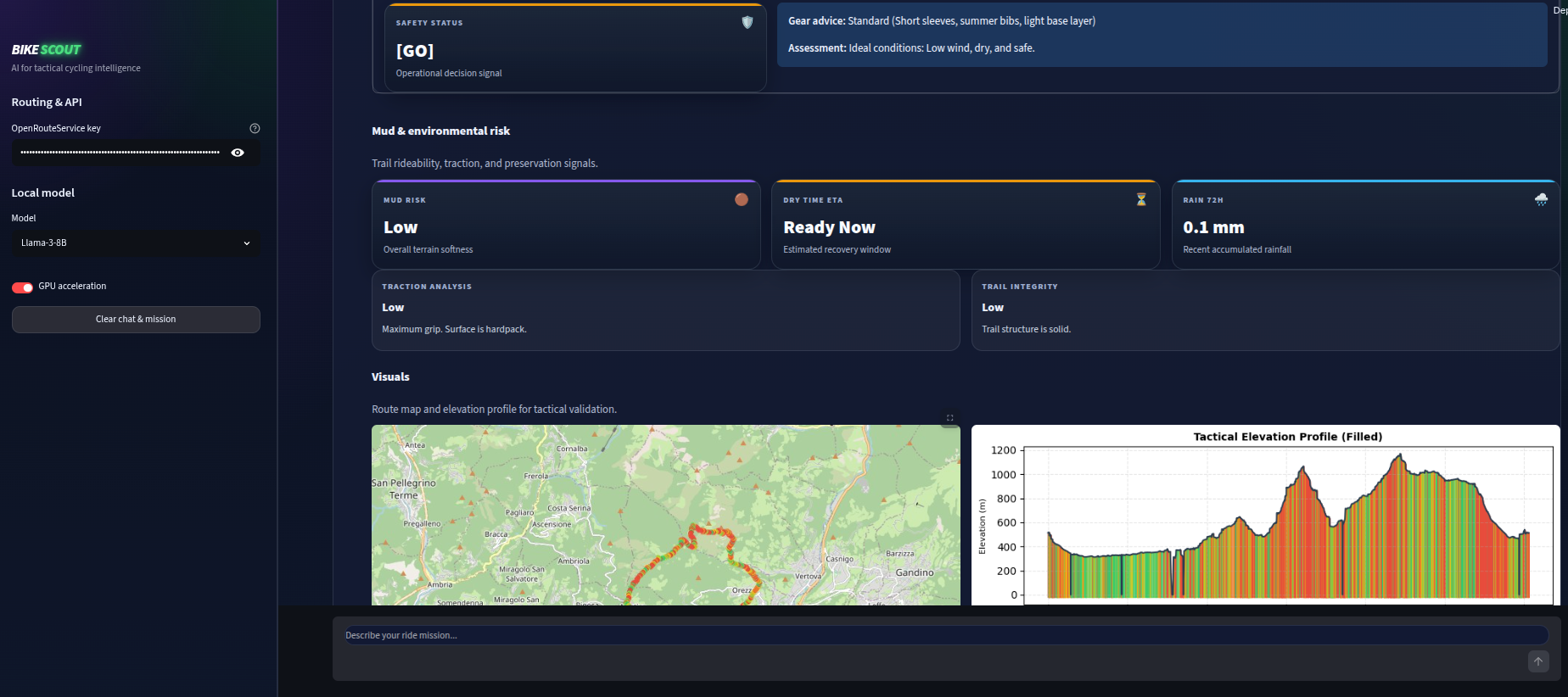
The BikeScout Tactical GUI is a high-performance, interactive control center designed for cyclists and trail scouts who need real-time, data-driven mission planning. Built on top of the Streamlit framework, it serves as a bridge between localized Large Language Models (LLMs) and specialized tactical tools.
Unlike a standard chat interface, this GUI is an Intelligence Dispatcher: it translates natural language requests into precise parameters for geospatial analysis, weather windowing, and physiological fueling plans.
Core Capabilities
-
• On-Device Intelligence: Runs fully local LLMs (like Llama 3.1) via
llama-cpp-python, ensuring your mission data stays private and functions without an internet connection. - • Tactical Visualizations: Automatically renders high-resolution maps, elevation profiles, and weather trend charts directly within the conversation.
- • Modular Intelligence: Orchestrates diverse data sources including geospatial engines, TAEL© Mud Risk predictive soil analysis, and Strategic Nutrition fueling targets.
- • Dynamic Briefings: Generates structured briefings with downloadable GPX files, mechanical setup advice (tire pressure), and safety warnings.
How to use the GUI:
-
Clone the repository:
git clone git@github.com:hifly81/bikescout.git -
Create a Python virtual environment:
python3 -m venv venv -
Activate the Python virtual environment:
source venv/bin/activate -
Install the BikeScout package:
pip install bikescout -
Launch the GUI: Run the following command from your terminal:
streamlit run src/bikescout/app.pyThe application will open in your default browser at: http://localhost:8501/
-
Configure OpenRouteService API Key:Navigate to the Configuration section in the left sidebar and enter your
ORS_API_KEY. -
Download LLM Engine: Select and download a supported model.
Note: Ensure you have approx. 5GB - 8GB of free disk space.
- Llama-3-8B (Standard)
- Llama-3.1-8B-Instruct (Advanced)
- Use the GUI: Once the download is complete, enter your parameters into the chat text area.
Prompt Example:
"Find a route of approximately 25 km nearby Albano Laziale, Rome, Italy. I'm riding a 29-inch wheel bike. Include POIs, weather, nutrition, mud analysis, GPX export, map, and altimetry."
Prompt Example:
"Find a route from Albano Laziale, Rome, Italy to Cori, Latina, Italy . I'm riding a road bike. Add poi, weather, nutrition, map, mud, gpx, map, altimetry."
Prompt Example:
"Find a route of approximately 52 km, even more or less, nearby Moab, USA. I'm riding a 29-inch wheel bike. Add amenities and go no go report."
Using an MCP client (e.g. Claude Desktop, Cursor, Google Antigravity)
Pre-Requirements:
- • Python 3.10+
- • OpenRouteService Key: Sign up for obtaining a free key.
- • MCP Client: Such as Claude Desktop, Cursor, Google Antigravity, Codex, Windsurf.
To integrate BikeScout with your preferred MCP client (e.g. Claude Desktop, Cursor, Google Antigravity), add the following configuration to your settings file:
-
Clone the repository:
git clone git@github.com:hifly81/bikescout.git
-
Create a Python virtual environment:
python3 -m venv venv
-
Activate the Python virtual environment:
source venv/bin/activate
-
Install the BikeScout package:
pip install bikescout
Add the server to your MCP client config file:
-
Claude Desktop:
.claude/settings.json -
Cursor:
.cursor/mcp.json -
Google Antigravity:
.gemini/antigravity/mcp_config.json -
Codex:
.codex/config.toml -
Windsurf:
.codeium/windsurf/mcp_config.json
{
  "mcpServers": {
    "bikescout": {
      "command": "PATH/TO/YOUR/PYTHON_VENV",
      "args": ["-u", "-m", "bikescout.mcp_server"],
      "env": {
        "PYTHONPATH": "PATH/TO/SRC",
        "ORS_API_KEY": "YOUR_KEY"
      }
    }
  }
}
Configure Skills in your MCP Client
Pre-Requirements:
- • MCP Client: Such as Claude Desktop, Cursor, Google Antigravity, Codex, Windsurf.
To integrate BikeScout Skills with your preferred MCP client (e.g. Claude Desktop, Cursor, Google Antigravity), follow these steps:
-
Clone the repository:
git clone git@github.com:hifly81/bikescout.git
Add the .agents/skills folder in the following locations:
-
Cursor:
~/.agents/skills -
Google Antigravity:
~/.gemini/antigravity/skills -
Codex:
~/.agents/skills
Using Docker and OpenClaw
Pre-Requirements:
- • Docker Desktop: Download here
- • OpenRouteService Key: Sign up for trail data
- • LLM Key: OpenAI or Anthropic API Key
- Download the repository as a ZIP and extract it.
- Rename
.env.exampleto.envand paste keys:ORS_API_KEY=your_ors_key_here
OPENAI_API_KEY=your_llm_key_here - Run:
docker-compose up -d
- Access: http://localhost:3000
- To stop the environment, Run: docker-compose down
Using Docker, Ollama and Open WebUI
If you prefer a private and free experience without external API costs.
Pre-Requirements:
- • Docker Desktop: Download here
- • OpenRouteService Key: Sign up for trail data
- Download the repository as a ZIP and extract it.
- Rename
.env.exampleto.envand paste keys:ORS_API_KEY=your_ors_key_here - Run:
docker compose -f docker-compose-ollama.yml up -d
- Download a LLM model for Ollama, example llama3.1:8b:
docker exec -it ollama ollama pull llama3.1:8b
- Launch Open WebUI:
http://localhost:3000and follow the instructions to create a first user.
- To stop the environment, Run: docker-compose -f docker-compose-ollama.yml down
To integrate the MCP tools within the Open WebUI interface, follow these steps:
- Navigate: Go to Admin Panel Settings Integrations.
- Add Connection: Click the + button and fill the following:
| Field | Tactical Value |
|---|---|
| Type | OpenAPI |
| URL | http://mcpo:8000/bikescout |
| OpenAPI Spec | Set to URL and use openapi.json |
| Auth | None |
| ID / Name | bikescout |
Once saved, you can enable this tool for your specific models in the New Chat, Workspace or Model settings, allowing the LLM to access real-time data through the server.
Debugging and Testing
You can test BikeScout using the MCP Inspector, a web-based tool for testing MCP servers. To launch the inspector and interact with the tools manually, run the following command from the root directory:
-
SET ORS_API_KEY as environment variable:
export ORS_API_KEY=YOUR_KEY -
Launch MCP Inspector:
PYTHONPATH=./src npx @modelcontextprotocol/inspector ./venv/bin/python3 -m bikescout.mcp_server
Automated Unit Tests & Coverage
Run the test suite with pytest:
-
Create a Python virtual environment:
python3 -m venv venv -
Activate the Python virtual environment:
source venv/bin/activate -
Install the BikeScout package, including pytest:
pip install bikescout && pip install -e ".[test]" -
Run all tests:
python -m pytest -
Run with Coverage Report:
python -m pytest --cov=src/bikescout --cov-report=term-missing